
Netflix VOID: AI Object Removal in Video
Netflix VOID cuts the subject out of your video and drops in any backdrop — green, color, photo, or video. Upload, pick, download.
Free demo. No signup. No install.
Netflix VOID Background Tool
AI video background remover & changer demo — upload a clip, pick a new background, download the result.
Netflix VOID is loading — first run takes 30 to 60 seconds...
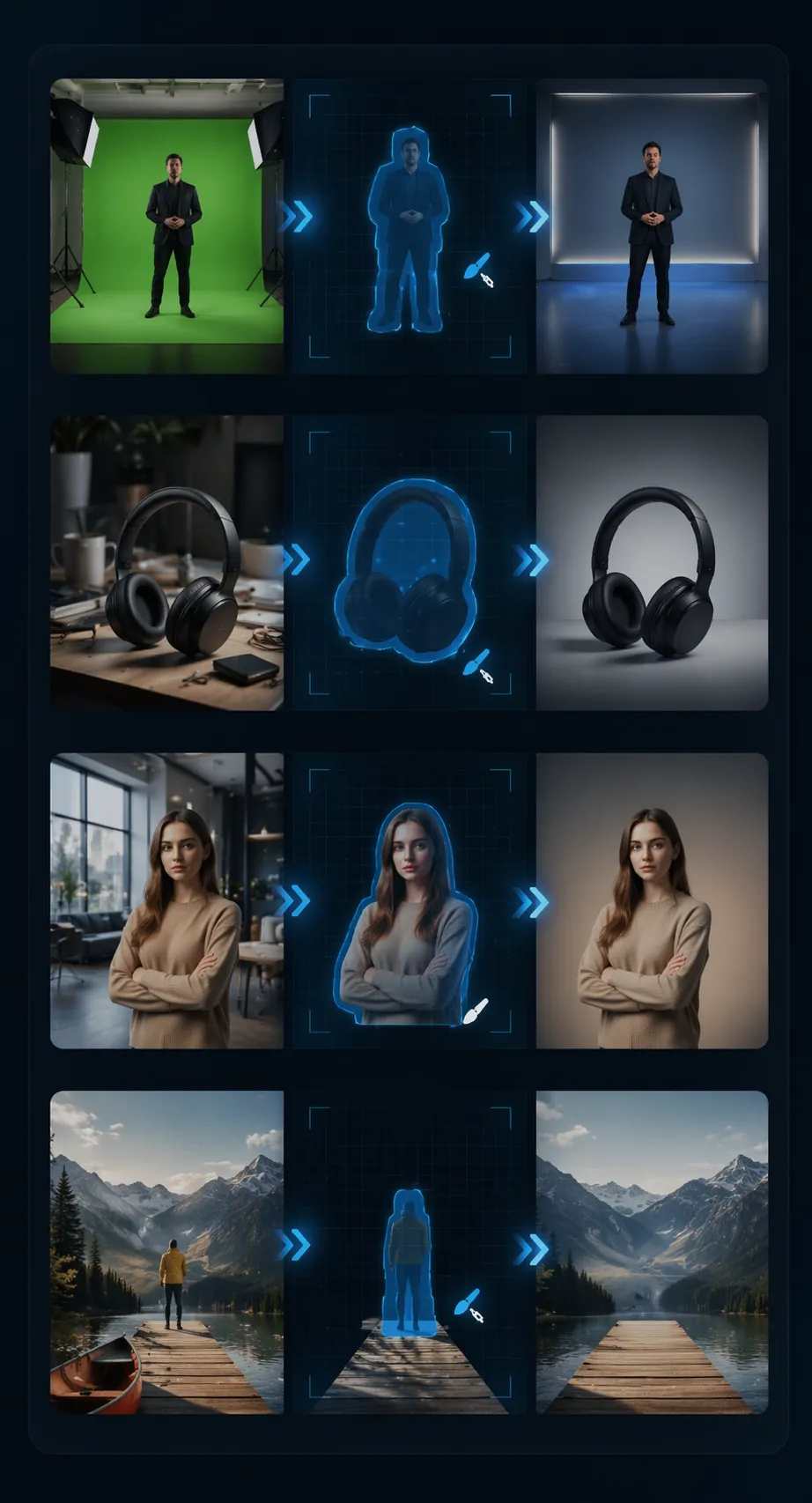
What You Can Do With Netflix VOID
Netflix VOID splits the subject from the background in your video. You pick what shows up behind them — plain green, a brand color, a photo, or a moving scene. The subject stays sharp in every frame.
- Green Screen Without a Green ScreenNo green wall on set? Drop the clip in. The AI cuts the subject out cleanly, then hands you a solid-green or transparent-background version ready for any video editor.
- Clean Product Demo VideosCluttered desk behind your product? The AI strips the mess. Drop in a studio color or a branded backdrop — studio-grade shots, zero set dressing.
- Portrait Content for YouTube & TutorialsTalking-head videos for YouTube, courses, interviews, podcasts. Swap the wall behind you for an office, a studio, a brand pattern, or a soft blur. You stay crisp.
- Remix, Memes, and EditsPull a subject out of a movie clip, a music video, or a viral moment. Drop it into a new scene for memes, mashups, or reaction edits. You get the clean cutout to build on.
Why Creators Pick Netflix VOID
Three reasons editors keep coming back to Netflix VOID instead of buying yet another plugin or renting a green-screen studio:

Netflix VOID in Three Steps
From a raw clip to a clean cutout — here is the full flow:
1. Drop In Your Video
Pick a clip from your device or drag it onto the upload area. MP4 and WebM run smoothly. Short clips finish first on the demo GPU.
2. Pick a Background
Choose green screen, a solid color, a still image, or another video as the new backdrop. Netflix VOID handles the cutout and the placement automatically.
3. Download the Result
When the AI finishes, download the clip with the new background applied. Matches your original — same resolution, same frame rate. No watermark added.
What Netflix VOID Does
Six things the demo does well — and what to expect when you try it on your own clips:
Skip the Manual Cutout Work
The AI picks out the person or main subject on its own. No painting, no frame-by-frame tracing, no green-screen setup. Your subject stays sharp.
Background Replacement
Swap the original backdrop for a solid color, a still image, or a video loop. Drop in your brand color, a studio look, or a moving scene — the AI places it behind the subject.
Green Screen & Transparent Output
Need a clean cutout for editing? The demo can export a solid-green or transparent-background version of your clip, ready for any video editor.
No Flicker, No Jump
The AI reads your clip as a moving whole, not single pictures. Cutout edges hold steady while the subject moves — clean and ready to share.
Quick Turnaround
Short clips finish in under a minute on the demo GPU. Longer clips take more — split big files into smaller chunks for the fastest run.
Browser-Based, No Install
The demo runs in your browser. Heavy lifting happens server-side, so your phone, tablet, or laptop only needs a browser and a stable connection.
Netflix VOID at a Glance
Quick numbers on the demo:
200 Frames Per Pass
Frames Per Pass
<60s Per Short Clip
Per Short Clip
$0 Free Demo
Free Demo
Real Edits with Netflix VOID


Frequently Asked Questions About Netflix VOID
Quick answers about Netflix VOID — what the demo does, what it costs, and how it handles your video clips.
Ready to Try Netflix VOID?
Netflix VOID is a free demo — no signup, no install. Try it now.